FIVEWIN Withdraw – Bank Withdrawal & Account Verification Guide
The FIVEWIN Withdraw page provides information about requesting withdrawals from an account through the Wallet Withdraw section. Users can review their withdrawable balance, add a bank account, complete the required verification and set up a fund password before submitting a withdrawal request. This guide explains the withdrawal process, supported banking options, fund password requirements and important instructions to help users understand how withdrawals work on FIVEWIN.
- 1. FIVEWIN Withdraw – Bank Withdrawal Overview
- 2. FIVEWIN Withdrawal Steps – How to Withdraw Funds
- 3. Bank Account Verification – Requirements & Supported Banks
- 4. Fund Password Setup – Withdrawal Security Requirements
- 5. Withdrawal Requirements & Processing Information
- 6. Important Withdrawal Instructions & Account Security
- 7. Frequently Asked Questions About FIVEWIN Withdraw
FIVEWIN Withdraw – Bank Withdrawal Overview
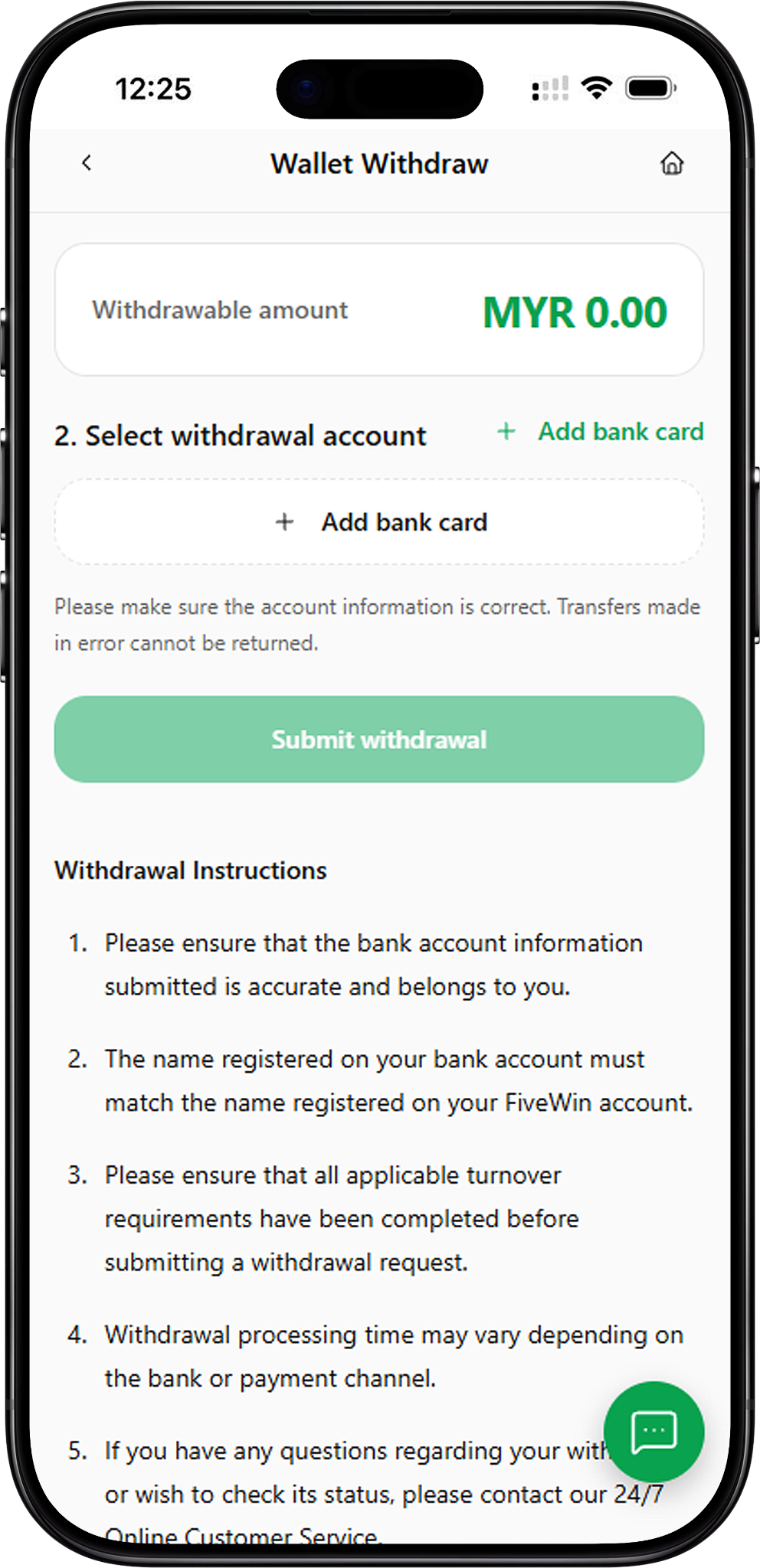
FIVEWIN provides a Wallet Withdraw section where users can review their available withdrawal balance and manage the bank account used to receive funds. The withdrawal interface includes a withdrawable amount display, a withdrawal account selection area and a Submit Withdrawal button. Before requesting a withdrawal, users may need to complete bank account verification, add their banking information and create a fund password.
Wallet Withdraw – Access Your Withdrawal Account
The Wallet Withdraw section is available through the account navigation menu. Users can open this page to review their withdrawable balance, select a linked bank account and access the withdrawal submission function. The displayed balance indicates the amount currently available for withdrawal, which may differ from the total account balance.
Bank Withdrawal – Receive Funds Through a Linked Account
Bank Withdrawal allows users to request a transfer to a registered bank account. The platform provides an Add Bank Card function for entering banking information and selecting an available bank. Users should ensure that their registered bank account details are accurate before proceeding with a withdrawal request.
Withdrawal Verification & Fund Password
FIVEWIN includes account verification and fund password requirements as part of its withdrawal process. The verification form requests the account holder’s full name, bank selection and card number, while the Fund Password section allows users to create a six-digit password. These requirements help users manage their withdrawal information and access the relevant account functions.
FIVEWIN Withdrawal Steps – How to Withdraw Funds
The FIVEWIN withdrawal process involves accessing the Wallet Withdraw page, reviewing the available balance, selecting a withdrawal account and completing the required account information. Users may also need to create a fund password before submitting a request. Follow the steps below to understand the withdrawal process shown in the platform interface.
Step 1: Log In to Your FIVEWIN Account
Visit the FIVEWIN website and sign in using your registered account credentials. After accessing your account, open the account navigation menu to locate the available wallet and account management functions.
Step 2: Open the Wallet Withdraw Section
Select Wallet Withdraw from the account menu. The withdrawal page displays your withdrawable amount and the withdrawal account selection area. Review the available balance before proceeding with the withdrawal process.
Step 3: Complete Bank Account Verification
If the platform requests account verification, complete the displayed verification form. Enter your full name, select your bank and provide the required card number containing 10 to 16 digits. Review the information carefully before clicking Submit Verification or Resubmit Verification, depending on the option displayed.
Step 4: Add Your Bank Card
Under Select Withdrawal Account, click Add Bank Card to open the banking information form. Select your bank from the available options and enter the requested card number. After checking the details, click Confirm Add to submit the bank card information.
Step 5: Set Up Your Fund Password
If you have not created a fund password, the platform may display a Fund Password notification before allowing you to continue. Click Set Now to access the Fund Password page. Enter a six-digit password, confirm it in the second field and select Create Fund Password. Avoid using repeated or sequential numbers, as these combinations are not accepted by the displayed password requirements.
Step 6: Select Your Withdrawal Account
Return to the Wallet Withdraw section and select the bank account you want to use for the withdrawal. Ensure that the account belongs to you and that the registered bank account name matches the name associated with your FIVEWIN account.
Step 7: Review Your Withdrawable Balance
Check the Withdrawable Amount displayed on the withdrawal page. The available balance determines how much may be eligible for withdrawal. Users should also ensure that any applicable turnover requirements have been completed before submitting a withdrawal request.
Step 8: Submit Your Withdrawal Request
Once the required banking information and account security settings are complete, review the withdrawal details and click Submit Withdrawal when the option becomes available. Follow any additional instructions displayed by the platform. Withdrawal processing time may vary depending on the selected bank or payment channel.
Bank Account Verification – Requirements & Supported Banks
Bank account verification is an important part of the FIVEWIN withdrawal process. The platform requests banking information to associate the withdrawal account with the registered user. Users should provide accurate information and ensure that the selected account belongs to them.
Full Name, Bank Selection & Card Number
The verification form contains three main fields: Full Name, Bank and Card Number. Enter the full name associated with your bank account, select the appropriate banking institution and provide the requested number. The displayed Card Number field accepts 10 to 16 digits. Incorrect information may affect the verification process or prevent a withdrawal request from proceeding.
Supported Banks for Withdrawal Verification
The verification bank selection interface displays several Malaysian banks and payment providers. Options shown include Maybank, Affin Bank Berhad, Alliance Bank, AMBank, Bank Islam Malaysia, Bank Kerjasama Rakyat, Bank Muamalat, Bank of China, Agro, Bank Simpanan Nasional, China Construction Bank, CIMB, Citibank, Hong Leong Bank, HSBC Bank, Kuwait Finance House, MBSB Bank, OCBC Bank, Public Bank, RHB, Standard Chartered Bank, Touch N Go, United Overseas Bank, GXBank, Boost Bank and Ryt Bank. Available options may vary depending on the account verification interface.
Adding a Bank Card for Withdrawals
The Add Bank Card function allows users to register a bank account for withdrawal purposes. The form requires users to select a bank and enter a card number containing 10 to 16 digits. After completing the required fields, click Confirm Add. The interface also indicates that default bank cards cannot be deleted, so users should verify their information before submitting it.
Available Banks for Bank Card Registration
The bank card registration interface displays institutions such as Affin Bank Berhad, Alliance Bank Malaysia Berhad, Bank Simpanan Nasional, CIMB Bank Berhad, Hong Leong Bank Berhad, Malayan Banking Berhad, Public Bank Berhad, RHB Bank Berhad, AmBank, Bank Islam Malaysia Berhad, Bank Kerjasama Rakyat Malaysia, Bank Muamalat Malaysia Berhad, HSBC Bank Malaysia Berhad, Kuwait Finance House, OCBC Bank, Standard Chartered Bank, United Overseas Bank, Touch N Go, GX Bank, Citi Bank, China Construction Bank, Industrial & Commercial Bank of China, Agrobank, Boost Bank, MBSB Bank and Ryt Bank. The actual selection should be confirmed in the current bank registration interface.
Bank Account Name Matching Requirements
The name registered on the withdrawal bank account must match the name registered on the user’s FIVEWIN account. Users should ensure that their banking information is accurate and belongs to them. Incorrect transfers may not be recoverable, so all details should be reviewed before submitting a withdrawal request.
Fund Password Setup – Withdrawal Security Requirements
FIVEWIN provides a Fund Password function for managing account security during withdrawal-related activities. Users who have not configured a fund password may be prompted to create one before proceeding. The password setup interface requires a six-digit password that follows the displayed security rules.
Why Is a Fund Password Required?
The platform displays a Fund Password notification when a user attempts to access withdrawal functions without having configured the required password. The notification explains that a fund password must be set before making a withdrawal. Users can select Set Now to open the password creation page.
Create a Six-Digit Fund Password
On the Fund Password page, enter a six-digit password in the Fund Password field. The password must contain exactly six digits and cannot consist entirely of repeated or sequential numbers. Users should choose a combination that meets the displayed requirements.
Confirm Your New Fund Password
Enter the same six-digit password in the Confirm New Fund Password field. Make sure both entries match before clicking Create Fund Password. If the password does not meet the required format, the platform displays a validation message explaining the restriction.
Protect Your Fund Password
Keep your fund password confidential and avoid sharing it with other people. Do not use easily predictable number combinations. A properly configured fund password helps protect access to withdrawal-related account functions.
Withdrawal Requirements & Processing Information
Before submitting a withdrawal request, users should review their available balance, registered banking information and applicable account requirements. The FIVEWIN withdrawal interface also provides instructions regarding turnover requirements, bank account accuracy and processing times.
Withdrawable Balance
The Wallet Withdraw page displays a Withdrawable Amount that indicates the funds currently available for withdrawal. Users should review this figure before requesting a transfer. The amount shown may depend on the account’s current balance and applicable withdrawal conditions.
Applicable Turnover Requirements
FIVEWIN instructs users to complete all applicable turnover requirements before submitting a withdrawal request. Users should review any outstanding requirements associated with their account or promotional participation before proceeding.
Withdrawal Processing Time
Withdrawal processing time may vary depending on the bank or payment channel. The supplied interface does not specify a fixed processing duration, so users should avoid assuming that every withdrawal will be completed within the same period.
Withdrawal Amount Limits
The provided screenshots display the withdrawable balance but do not specify a universal minimum or maximum withdrawal amount. Users should refer to the current withdrawal interface or contact customer service for information about applicable limits.
Withdrawal Status & Customer Support
Users who have questions about a withdrawal or want to check its status can contact FIVEWIN’s 24/7 Online Customer Service. The support team can provide assistance with withdrawal-related enquiries and account requirements.
Important Withdrawal Instructions & Account Security
FIVEWIN provides withdrawal instructions to help users understand the requirements for submitting a request. These instructions emphasize accurate bank account information, matching account holder names, completion of applicable turnover requirements and awareness of processing times.
Verify Your Bank Account Information
Ensure that all submitted bank account information is correct and belongs to you. Carefully review the selected bank and account number before submitting a withdrawal request.
Use a Bank Account Registered Under Your Name
The bank account holder’s name must match the name registered on the FIVEWIN account. Users should avoid submitting withdrawal details belonging to another person, as this may conflict with the platform’s withdrawal requirements.
Complete Applicable Turnover Requirements
Before submitting a withdrawal request, ensure that all applicable turnover requirements have been completed. Outstanding requirements may affect withdrawal eligibility.
Allow for Different Bank Processing Times
Withdrawal processing times can vary between banks and payment channels. Users should review the current transaction information and contact customer service if additional clarification is required.
Contact Customer Service for Assistance
If you encounter problems during the withdrawal process or need information about a pending request, contact FIVEWIN’s 24/7 Online Customer Service. Provide the relevant account and transaction information through the platform’s support channel.
Frequently Asked Questions About FIVEWIN Withdraw
Find answers to common questions about bank withdrawals, account verification, fund passwords, supported banks, withdrawal requirements and processing times.
How do I withdraw money from FIVEWIN?
Log in to your account, open Wallet Withdraw, review your withdrawable balance and select a registered bank account. Complete any required verification and fund password setup before submitting your withdrawal request.
Do I need to verify my bank account before withdrawing?
The platform provides a bank account verification form requesting your full name, bank selection and card number. Users should complete the verification requirements displayed for their account before proceeding with applicable withdrawal functions.
How do I add a bank account for withdrawals?
Open Wallet Withdraw and click Add Bank Card. Select your bank, enter the required card number and click Confirm Add after reviewing the information.
What banks are supported for withdrawals?
The bank registration interface displays several Malaysian banks, including Maybank, CIMB, Public Bank, RHB, Hong Leong Bank, Affin Bank, Alliance Bank and other institutions. Available options should be confirmed through the current bank selection interface.
What is a FIVEWIN fund password?
A fund password is a six-digit password configured through the Fund Password section. The platform requires users to set this password before making a withdrawal.
How do I create a fund password?
Open the Fund Password page, enter a six-digit password and confirm it in the second field. The password cannot consist entirely of repeated or sequential numbers. Click Create Fund Password after completing both fields.
Can I withdraw to someone else’s bank account?
The withdrawal instructions state that the bank account must belong to the user and that the registered bank account name must match the name associated with the FIVEWIN account.
Why is my withdrawal unavailable?
Withdrawal availability may depend on the withdrawable balance, bank account information, fund password setup and applicable turnover requirements. Users should review the information displayed on their account and contact customer service if they need assistance.
How long does a FIVEWIN withdrawal take?
Withdrawal processing time may vary depending on the bank or payment channel. The supplied platform instructions do not provide a fixed completion time.
Is there a minimum withdrawal amount?
The provided screenshots do not specify a minimum withdrawal amount. Users should check the current Wallet Withdraw interface or contact customer service for the applicable withdrawal limits.
Can I delete my registered bank card?
The Add Bank Card interface states that default cards cannot be deleted. Users should verify their bank information before confirming the registration.
What should I do if my withdrawal has not arrived?
Contact FIVEWIN’s 24/7 Online Customer Service to enquire about the withdrawal status. Processing times may vary depending on the selected bank or payment channel.
Access FIVEWIN Withdraw – Manage Your Withdrawal Account
Open the FIVEWIN Wallet Withdraw section to review your withdrawable balance, manage your registered bank account and complete the required security settings. Verify your account information and withdrawal requirements before submitting a request.