FIVEWIN Deposit – Bank Transfer & QR Pay Guide
The FIVEWIN Deposit page provides information about adding funds to an account through supported payment methods, including Bank Transfer and QR Pay. Users can select an available payment option, enter a deposit amount and review the transaction details before confirmation. The platform also provides bank account verification, optional promotional selections and payment instructions to help users complete the process. This guide explains the available deposit methods, supported banks, payment requirements and important precautions.
- 1. FIVEWIN Deposit – Available Payment Methods
- 2. Bank Transfer Deposit Steps – How to Deposit via Bank Transfer
- 3. QR Pay Deposit Steps – How to Deposit via QR Pay
- 4. Bank Account Verification – Supported Banks & Requirements
- 5. Deposit Amounts, Fees & Available Promotions
- 6. Important Deposit Instructions & Payment Security
- 7. Frequently Asked Questions About FIVEWIN Deposit
FIVEWIN Deposit – Available Payment Methods
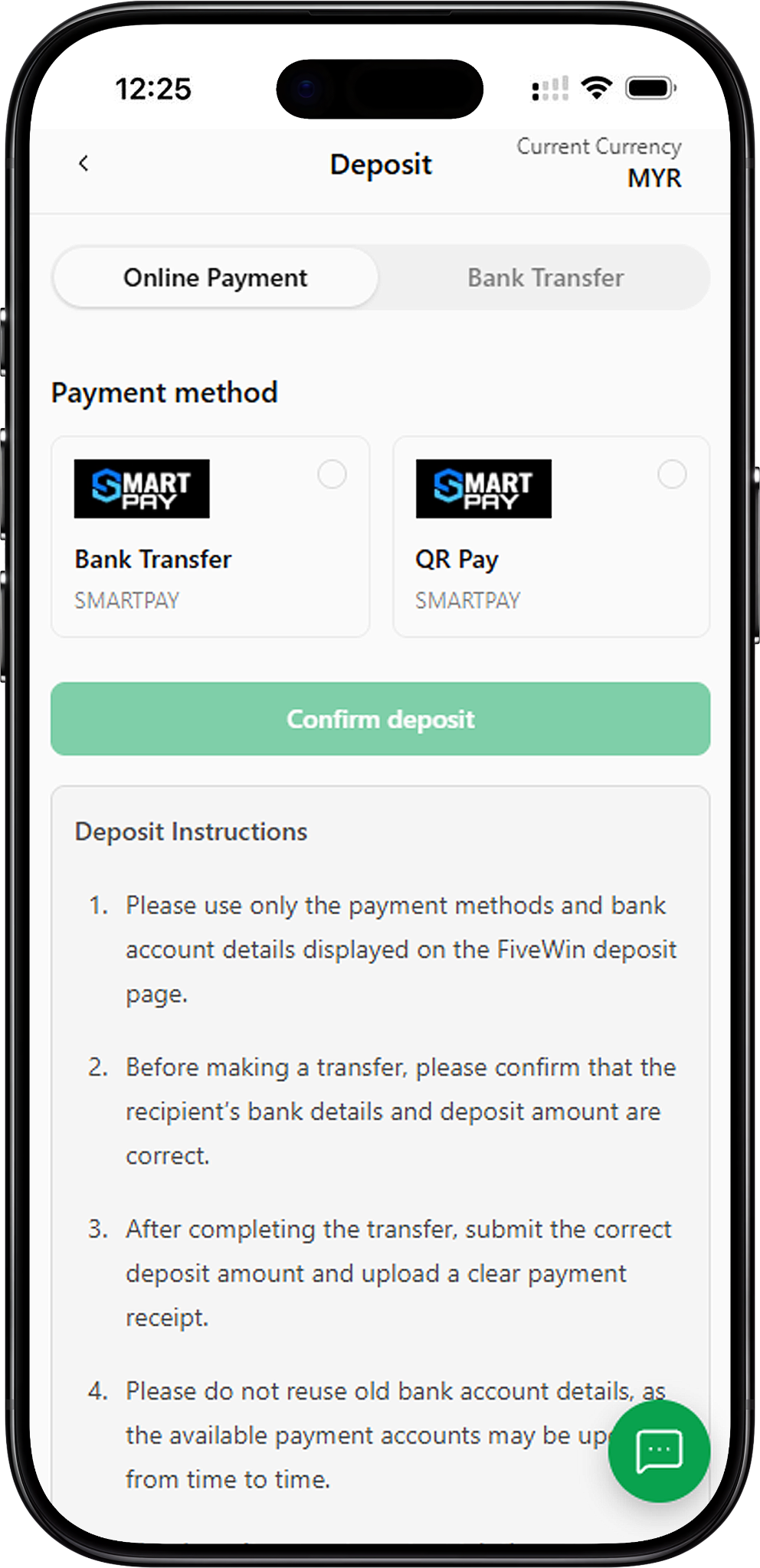
FIVEWIN provides multiple payment options for users who want to add funds to their accounts. The Deposit page includes an Online Payment section with Bank Transfer and QR Pay options provided through SMARTPAY. Users can select their preferred payment method, enter the required information and review the transaction details before proceeding. Available payment methods and banking options may vary depending on the platform’s current payment arrangements.
Bank Transfer – Deposit Through Supported Banks
Bank Transfer allows users to make deposits using a supported bank account. After selecting the Bank Transfer payment method, users can choose an available bank, enter the deposit amount and review any optional promotions before confirming the transaction. The platform displays the relevant payment information and instructions during the deposit process.
QR Pay – Deposit Through QR Payment
QR Pay provides another payment option through SMARTPAY. Users can select QR Pay from the available payment methods, enter their preferred deposit amount and review the payment details before proceeding. Any additional payment instructions should be followed according to the information displayed during the transaction.
SMARTPAY – Available Online Payment Provider
SMARTPAY is displayed as the payment provider for both Bank Transfer and QR Pay in the FIVEWIN Online Payment section. Users can select either method depending on their preferred payment arrangement and the options currently available on the platform.
Bank Transfer Deposit Steps – How to Deposit via Bank Transfer
The Bank Transfer deposit process allows users to select an available bank, enter a deposit amount and confirm their payment details. The following steps explain the process based on the FIVEWIN deposit interface. Users should verify the information displayed during each stage before completing a transaction.
Step 1: Open the FIVEWIN Deposit Page
Log in to your FIVEWIN account and navigate to the Deposit section. The page displays available payment categories, including Online Payment and Bank Transfer. Select Online Payment to view the supported SMARTPAY payment methods.
Step 2: Select Bank Transfer as Your Payment Method
Under Payment Method, locate the SMARTPAY Bank Transfer option and select it. The selected payment method will be highlighted, allowing you to continue with the required banking information.
Step 3: Choose Your Bank Account
Click Select Bank Account to open the list of available banks. Choose the bank you want to use for the deposit. The displayed options include Affin Bank Berhad, Alliance Bank Malaysia Berhad, Bank Simpanan Nasional, CIMB Bank Berhad, Hong Leong Bank Berhad, Malayan Banking Berhad, Public Bank Berhad and RHB Bank Berhad. Select the appropriate bank before proceeding.
Step 4: Enter Your Deposit Amount
Enter the amount you want to deposit in the Deposit Amount field. The displayed amount range is MYR 10 to MYR 50,000. Make sure the amount is within the permitted range and matches the amount you intend to transfer.
Step 5: Select an Available Promotion (Optional)
After entering the deposit amount, you may choose an available promotion. The platform displays promotional options such as the 155% Slot Welcome Bonus, 100% Slot Welcome Bonus, 100% Live Casino Welcome Bonus and 200% Welcome Bonus Sportsbook. Select View Promotion Details to review the applicable terms and conditions before choosing an offer. This step is optional.
Step 6: Review Your Deposit Details
Check the transaction summary before proceeding. The platform displays the Deposit Amount, Fee and Amount Payable. For example, a deposit of MYR 100 may show a fee of MYR 0.00 and a total payable amount of MYR 100.00. These figures are examples from the provided interface, and the actual amount payable should always be confirmed on the transaction page.
Step 7: Confirm Your Bank Transfer Deposit
After reviewing the selected bank, deposit amount and payment summary, click Confirm Deposit to continue. Follow the payment instructions displayed by the platform and complete the transfer using the current recipient information. If a payment receipt is required, provide a clear and valid receipt showing the correct transaction amount.
QR Pay Deposit Steps – How to Deposit via QR Pay
QR Pay is another available deposit method provided through SMARTPAY. The process allows users to select QR Pay, enter a deposit amount, review optional promotions and confirm the transaction details. The following steps explain how to access the QR Pay option using the FIVEWIN deposit interface.
Step 1: Access the FIVEWIN Deposit Section
Sign in to your FIVEWIN account and open the Deposit page. Select Online Payment to display the available SMARTPAY payment methods.
Step 2: Select QR Pay
Under Payment Method, choose the SMARTPAY QR Pay option. The selected option will be highlighted, indicating that QR Pay has been chosen as the preferred payment method.
Step 3: Enter the Deposit Amount
Enter your preferred amount in the Deposit Amount field. The displayed deposit range is MYR 10 to MYR 50,000. Verify the amount carefully before proceeding to the next stage.
Step 4: Review Available Promotions (Optional)
The QR Pay deposit interface displays optional promotional offers, including Slot, Live Casino and Sportsbook welcome bonuses. Users can select View Promotion Details to review the applicable requirements before choosing an offer. Selecting a promotion is optional.
Step 5: Check the Payment Summary
Review the Deposit Amount, Fee and Amount Payable displayed below the promotional options. The provided example shows a deposit amount of MYR 100.00, a fee of MYR 0.00 and an amount payable of MYR 100.00. Confirm that the displayed details are correct before continuing.
Step 6: Confirm Your QR Pay Deposit
Click Confirm Deposit to proceed with the QR Pay transaction. Follow the payment instructions presented by SMARTPAY and complete the payment using the available QR payment process. Verify the transaction details and retain any relevant payment confirmation for reference.
Bank Account Verification – Supported Banks & Requirements
FIVEWIN provides a bank account verification form that requests the user’s full name, bank selection and card or account number. Users should ensure that the submitted banking information is accurate and belongs to the appropriate account holder. Verification requirements may apply before certain payment services can be used.
Complete Your Bank Account Information
The verification form contains three main fields: Full Name, Bank and Card Number. Enter your full name, choose the relevant bank from the available list and provide the requested number. The displayed Card Number field accepts 10 to 16 digits. Review the information carefully before clicking Submit Verification.
Supported Banks Available for Selection
The bank selection interface displays several Malaysian banking institutions and payment providers. Options shown in the supplied screenshots include Maybank, Affin Bank Berhad, Alliance Bank, AMBank, Bank Islam Malaysia, Bank Kerjasama Rakyat, Bank Muamalat, Bank of China, Agro, Bank Simpanan Nasional, China Construction, CIMB, Citibank, Hong Leong Bank, HSBC Bank, Kuwait Finance House, MBSB Bank Berhad, OCBC Bank, Public Bank, RHB, Standard Chartered Bank, Touch N Go, United Overseas, GXBank, Boost Bank and Ryt Bank. Availability may vary according to the payment service being used.
Submit Your Bank Account Verification
Once all required information has been entered, click Submit Verification. Ensure that the full name, selected bank and account details are correct before submission. Incorrect or incomplete information may affect the verification process.
Deposit Amounts, Fees & Available Promotions
The FIVEWIN deposit interface displays the permitted deposit range, transaction fees and optional promotional offers. Users can review these details before confirming a payment. The available options may depend on the selected payment method and the platform’s current arrangements.
Minimum & Maximum Deposit Amount
The displayed deposit amount range is MYR 10 to MYR 50,000 for the Bank Transfer and QR Pay examples. Users should enter an amount within the permitted range and verify the current limits shown on the payment page before submitting a transaction.
Deposit Fees & Amount Payable
The payment summary displays three important figures: Deposit Amount, Fee and Amount Payable. In the supplied example, a MYR 100 deposit has a displayed fee of MYR 0.00, resulting in an amount payable of MYR 100.00. Actual transaction charges may vary depending on the payment method or provider, so users should review the final amount before confirmation.
Optional Welcome Bonus Promotions
The deposit page displays several optional welcome bonus promotions. These include the 155% Slot Welcome Bonus, 100% Slot Welcome Bonus, 100% Live Casino Welcome Bonus and 200% Welcome Bonus Sportsbook. Each promotion has a View Promotion Details button, allowing users to review the relevant conditions before making a selection. Promotional availability and eligibility may change.
Reviewing Promotion Terms Before Depositing
Users should read the applicable promotional details before selecting an offer. Bonus eligibility, qualifying deposits and other requirements may differ between promotions. Selecting a promotion is optional, and users can review the displayed information before confirming their deposit.
Important Deposit Instructions & Payment Security
FIVEWIN provides deposit instructions to help users avoid payment errors and verify transaction information. Users should follow the current payment details displayed on the platform, ensure that all submitted information is accurate and retain valid payment records when required.
Use Only the Displayed Payment Information
Always use the payment methods and recipient bank account details shown on the current FIVEWIN deposit page. Payment accounts may be updated from time to time, so previously used banking details should not be reused without confirmation.
Verify the Recipient Details & Deposit Amount
Before making a bank transfer, confirm that the recipient’s bank details and deposit amount are correct. The amount transferred should match the amount entered during the deposit process and the information shown on the payment receipt.
Submit Accurate Payment Information
After completing a transfer, provide the correct deposit amount and upload a clear payment receipt when required. Altered, duplicate or invalid receipts are not accepted. Users should ensure that the submitted information accurately reflects the completed transaction.
Contact Customer Service for Deposit Assistance
If a deposit has not been credited or you encounter a payment-related issue, contact FIVEWIN’s 24/7 Online Customer Service for assistance. Provide the relevant transaction information so the support team can review the issue.
Frequently Asked Questions About FIVEWIN Deposit
Find answers to common questions about available payment methods, deposit amounts, bank verification, optional promotions and payment instructions.
How do I make a deposit on FIVEWIN?
Open the Deposit page, select an available payment method, enter the required deposit amount and review the transaction details. Click Confirm Deposit and follow the payment instructions displayed by the platform.
What payment methods are available for deposits?
The supplied interface shows SMARTPAY Bank Transfer and QR Pay under Online Payment. Additional payment arrangements may depend on the options currently displayed on the platform.
What is the minimum deposit amount?
The displayed minimum deposit amount is MYR 10 for the provided Bank Transfer and QR Pay examples. Users should verify the current minimum shown on the Deposit page.
What is the maximum deposit amount?
The supplied screenshots show a maximum deposit amount of MYR 50,000. Actual limits should be confirmed on the payment page before submitting a transaction.
Does FIVEWIN charge deposit fees?
The provided transaction example displays a fee of MYR 0.00 for a MYR 100 deposit. However, applicable fees may depend on the selected payment method or provider. Users should review the displayed payment summary before confirming.
Can I deposit using QR Pay?
Yes. QR Pay is listed as an available SMARTPAY payment method. Users can select QR Pay, enter the deposit amount and follow the displayed instructions to complete the transaction.
Which banks are supported for deposits?
The supplied deposit interface lists banks including Affin Bank, Alliance Bank, Bank Simpanan Nasional, CIMB, Hong Leong Bank, Maybank, Public Bank and RHB. Available banking options may vary depending on the selected payment method.
Do I need to verify my bank account before depositing?
The platform provides a bank account verification form requesting a full name, bank selection and card or account number. Users should complete any verification requirements displayed for their account before proceeding with applicable payment services.
Can I select a promotion when making a deposit?
Yes. The deposit interface displays optional welcome bonus promotions for Slot Games, Live Casino and Sportsbook. Users can review the promotional terms and select an eligible offer before confirming the deposit.
What should I do if my deposit is not credited?
Contact FIVEWIN’s 24/7 Online Customer Service and provide the relevant payment details. If requested, submit a clear and valid payment receipt to assist with the transaction review.
Can I reuse bank account details from a previous deposit?
Users should not reuse previously displayed recipient bank account details without verification. Payment accounts may change, so always follow the current information provided on the Deposit page.
Access FIVEWIN Deposit – Bank Transfer & QR Pay
Explore the available deposit methods, review supported banks and follow the payment instructions provided on FIVEWIN. Check the deposit amount, transaction fees and applicable requirements before confirming your payment.